
Mixing Station GLD Pro1.3.1 - Google Play
You'll be able to see results in few seconds.
Publisher Description


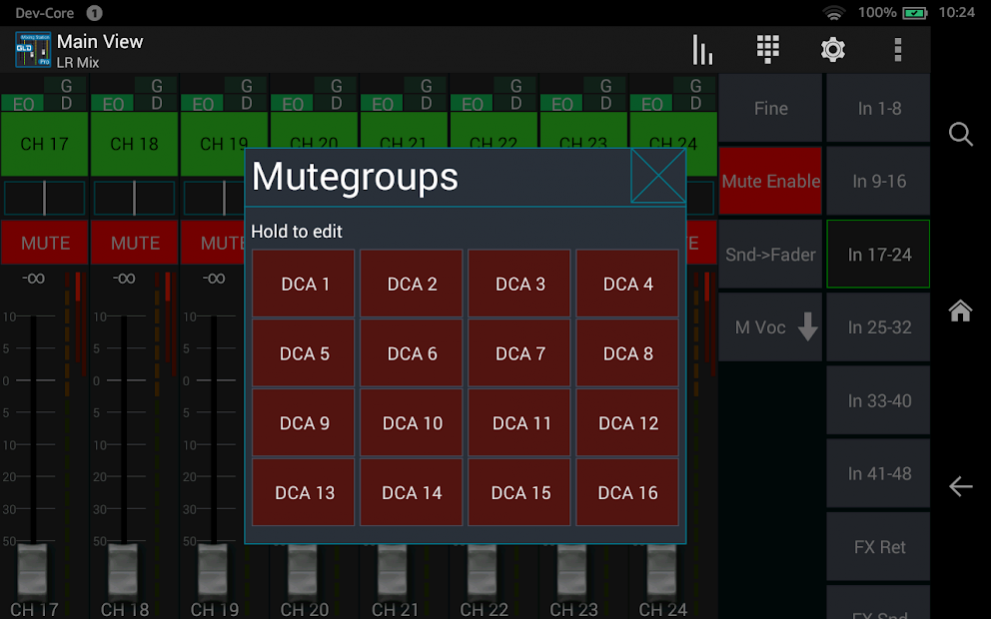
This app allows you to remote control the Allen & Heath GLD mixer with any android device.
Features:
- Access to most mixing parameters
- Configurable peak hold time
- Custom mixer layouts and custom layers
- Different themes for in and outdoor usage
- Supported FW version: V1.61
- Mix copy
- DCA assignment
- Metering for all channels
- Routing
- Matrix sends
- RTA
- USB Midi support
Compatible mixers:
- Any GLD which fulills the minimum firmware requirement
About Mixing Station GLD Pro
The company that develops Mixing Station GLD Pro is davidgiga1993. The latest version released by its developer is 1.3.1.
To install Mixing Station GLD Pro on your Android device, just click the green Continue To App button above to start the installation process. The app is listed on our website since 2021-10-31 and was downloaded 0 times. We have already checked if the download link is safe, however for your own protection we recommend that you scan the downloaded app with your antivirus. Your antivirus may detect the Mixing Station GLD Pro as malware as malware if the download link to com.davidgiga1993.mixingstation.ah_gldpro is broken.
How to install Mixing Station GLD Pro on your Android device:
- Click on the Continue To App button on our website. This will redirect you to Google Play.
- Once the Mixing Station GLD Pro is shown in the Google Play listing of your Android device, you can start its download and installation. Tap on the Install button located below the search bar and to the right of the app icon.
- A pop-up window with the permissions required by Mixing Station GLD Pro will be shown. Click on Accept to continue the process.
- Mixing Station GLD Pro will be downloaded onto your device, displaying a progress. Once the download completes, the installation will start and you'll get a notification after the installation is finished.
Program Details
System requirements
Download information
Pricing
Version History
version 1.3.1
posted on 2021-10-31
Changelog V1.2.1
= Added
- SI: Add invert colors to soundcraft versions
- Option: Fader reset with double tap
- Support for latest xair firmware
- Wing: New PEQ filter types
- Dl32S: Routing matrix for B input
- DL32S: Channel link and snapshots
- XM32: Show console name in search results (and in console settings)
- Wing: Layout for L100 and PIA2250 channel FX
- Metering for DCAs (peak of members)
= Fixed
Full changelog: https://dev-core.org/mixing-station/changelogs
version 1.3.0
posted on 2021-09-13
Changelog v1.3.0
= Added
- "Selection" element for custom layouts
- Backup / Restore for all app settings
= Fixed
- App theme not loaded
- Mix mutes not enforced in restricted access mode
Full changelog: https://dev-core.org/mixing-station/changelogs
version 1.2.4
posted on 2021-08-21
Changelog v1.2.4
= Added
- Label text format settings
- Group assignment indicator for channel strip
- Option to disable peq info box
- Channel View Graphic elements selectable as individual elements
- Add "Open FX" action for all mixers
- Mute/DCA assignment for channel actions
- Make Mix presets accessible in regular access mode
- Setup wizard for getting started more easily
= Fixed
- Issues samsung keybaords
= Changed
Full changelog: https://dev-core.org/mixing-station/changelogs
version 1.2.3
posted on 2021-06-19
Changelog v1.2.3
= Added
- Support for non motorized midi faders/knobs
- Gains on faders
- "Current PEQ band" to channel action
- "Select peq band" action
= Fixed
- Fix crash when using editing layer with old IDCA settings
= Changed
- Sends overview can now dragged directly without opening sends view
- Decrease minimum channels per layer to 4
Full changelog: https://dev-core.org/mixing-station/changelogs
version 1.2.2
posted on 2021-04-15
Changelog v1.2.2
= Added
- Open GEQ action
= Fixed
- App crashing when all channels are deselected in layer setup
- Channel delay "reset" sets to wrong value
- Crash when using FX action
- Crash when using app-link with midi
- XAir insert for LR reverting inserts of other channels
- Channel view not opening when deleting "channel view" from layout
- Memory leak in layout editor
Full changelog: https://dev-core.org/mixing-station/changelogs
version 1.2.0
posted on 2021-02-13
Changelog v1.2.0
= Added
- GLD: Hypabass FX
- New design for 16T and 16VU comp
= Fixed
- Midi MCU meters are not following midi scroll layer
- Midi MCU meter/display not cleared
- MixTarget only works for Mixer, not for channel strips
- SQ routing battle
- GLD: Q animation in PEQ is backwards
= Changed
- New rendering engine
Full changelog: https://dev-core.org/mixing-station/changelogs
version 1.1.9
posted on 2020-11-23
Changelog v1.1.9
= Added
- Hide gr meter on A&H mixers if processing is disabled
- Improved layer setup: Layer items can be locked to a mix
= Fixed
- Fix ReGain adjusting post fader sends
- Unsassigned Channel Strips staying with last assignement
- App Settings Save Dialog, Channel Strip scope not shown
version 1.1.9
posted on 2020-11-06
Changelog v1.1.9
= Added
- Hide gr meter on A&H mixers if processing is disabled
- Improved layer setup: Layer items can be locked to a mix
= Fixed
- Unsassigned Channel Strips staying with last assignement
- App Settings Save Dialog, Channel Strip scope not shown
version 1.1.9
posted on 2020-11-05
Changelog v1.1.9
= Added
- Improved layer setup: Layer items can be locked to a mix
= Fixed
- Unsassigned Channel Strips staying with last assignement
- App Settings Save Dialog, Channel Strip scope not shown
version 1.1.8
posted on 2020-10-19
Changelog v1.1.8
= Added
- Reset button for channel and scope selections
= Fixed
- Fixed mix IDCA not showing up in LR mix
Disclaimer
Official Google Play Link
We do not host Mixing Station GLD Pro on our servers. We did not scan it for viruses, adware, spyware or other type of malware. This app is hosted by Google and passed their terms and conditions to be listed there. We recommend caution when installing it.
The Google Play link for Mixing Station GLD Pro is provided to you by apps112.com without any warranties, representations or guarantees of any kind, so access it at your own risk.
If you have questions regarding this particular app contact the publisher directly. For questions about the functionalities of apps112.com contact us.
